Faster Dashboard Editing with Keyboard Shortcuts
What's New
Building dashboards in ControlCom Connect just got faster. This update brings keyboard shortcuts, multi-widget selection, and smoother navigation to the dashboard editor.
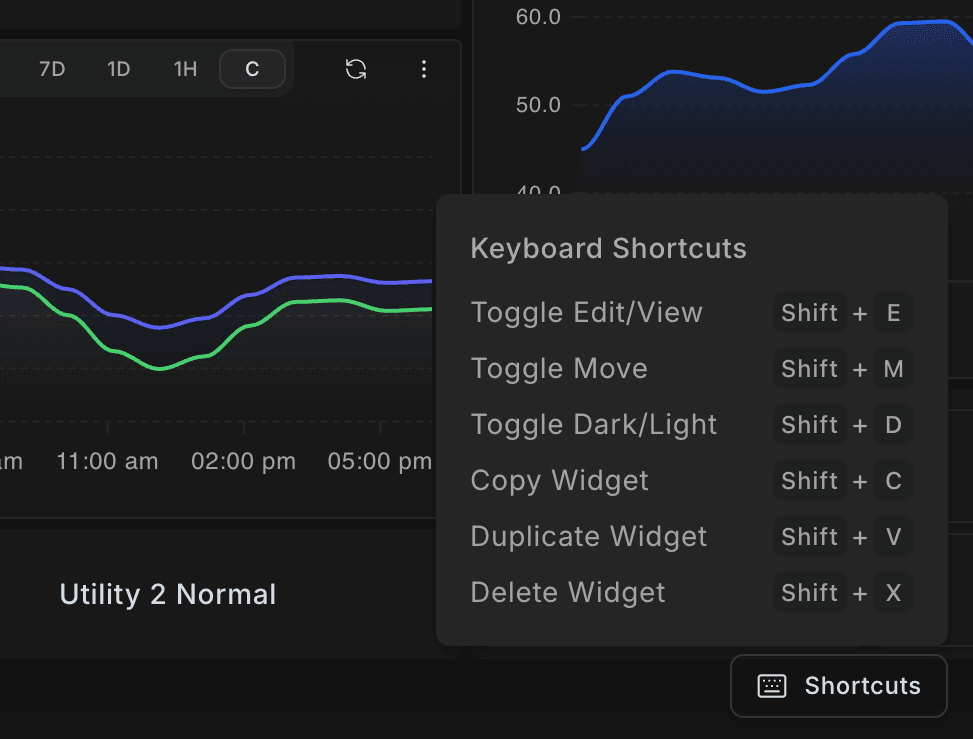
Keyboard Shortcuts
New keyboard shortcuts let you switch modes, copy widgets, and manage selections without reaching for your mouse. A Shortcuts button in the bottom-right corner of the editor shows all available commands.
Multi-Select Widgets
Select multiple widgets at once by holding Shift and clicking. Once selected, duplicate or delete your entire selection in one action—no more editing widgets one at a time.
Why It Matters
For integrators managing dozens of dashboards across sites, these updates mean less time clicking through menus and more time focused on what matters: keeping operations running. Small workflow improvements add up—especially when you're building dashboards for water systems, manufacturing floors, or distributed OEM equipment.